Claude Code Remote Control is great. It's also not enough
How to set up Claude Code Remote Control, why it won't start with API keys, gateways or Bedrock, and how we run Claude Code from a phone with GetPullRequest instead.
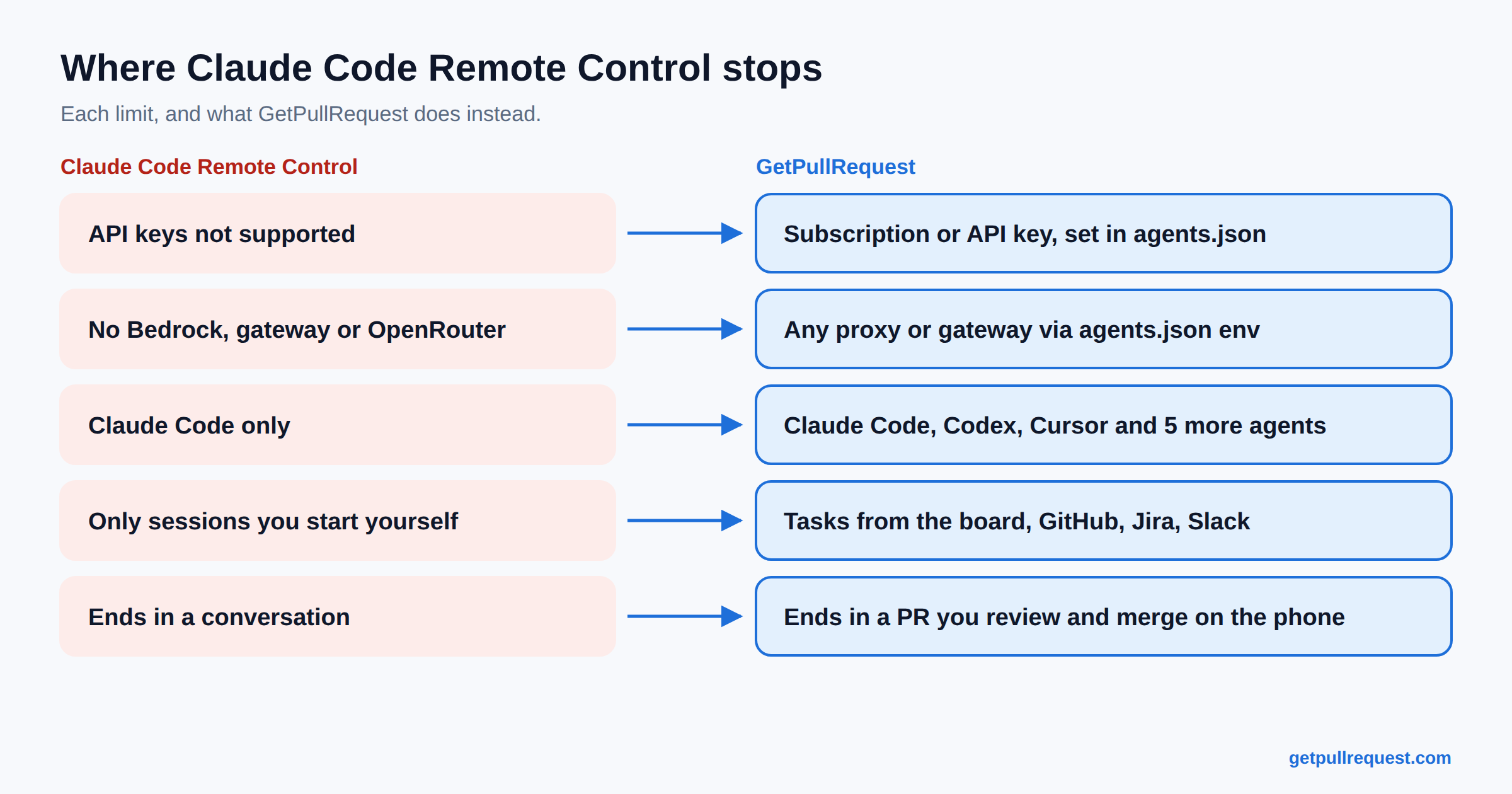
If all you want is to check on a Claude Code session from your phone, use Anthropic's Remote Control. It's built in, it comes with Pro or Max, and for that one job it beats what we make. We sell a competing product. Still true.
The rest of this is how to set Claude Code remote control up, why it sometimes refuses to start, and the point where it stopped being enough for us. That point is where GetPullRequest (GPR) comes in, and it won't be the same point for everyone. The short version: Remote Control is a chat window into one Claude session, running Anthropic's models. GPR is a universal remote for the dev tools you already use, whichever agent, whichever model, wherever the task came from.
TL;DR: Remote Control is a chat with one Claude Code session, on Anthropic's models and a claude.ai login. For that, it's the quicker tool. GPR is a universal remote: Claude Code, Codex, Cursor and five more agents, tasks from GitHub, Jira and Slack, any model or gateway you've configured, and a pull request at the end.
Setting up Claude Code remote control
On the machine where your repo lives:
claude remote-control
That starts a server that waits for your phone. Press space, a QR code shows up, scan it with the Claude app, and you're in the session. Already inside Claude Code? /remote-control, or /rc, does it for the conversation you have open. claude --remote-control starts a normal terminal session that's also reachable from the phone.
Everything still runs on your machine: files, MCP servers, tests. The phone sends messages, can attach a photo or a file, and gets a push when Claude finishes something or needs a decision. Server mode runs several sessions from one process (up to 32 by default), and --spawn worktree gives each new one its own git worktree, which you want if you're starting more than one. It's gotten noticeably better this year. If your laptop sleeps, it reconnects when it wakes.
Claude Code remote control not working?
It's nearly always one of these.
You're on an API key. Remote Control needs a claude.ai subscription login (Pro, Max, Team or Enterprise). ANTHROPIC_API_KEY won't do it, and neither will a token from claude setup-token. Run claude auth login.
You're not talking to Anthropic's API directly. Remote Control isn't available if you run Claude Code through Amazon Bedrock, Google Cloud's Agent Platform or Microsoft Foundry, if ANTHROPIC_BASE_URL points at an LLM gateway or company proxy (unset it), or if you sign in through an enterprise Claude apps gateway. That rules out a lot of companies that buy Claude through their cloud provider.
Your org hasn't turned it on. On Team and Enterprise an owner has to enable it in the Claude Code admin settings. Orgs with Zero Data Retention can't enable it at all, because the transcript syncs through Anthropic's servers.
The process died. Close the terminal and the session goes offline. claude remote-control --continue brings it back for about four hours after that; later than that you start fresh. On a remote box, put it in tmux. In server mode, lose the network for about ten minutes and the process exits.
Anthropic's Remote Control docs cover all of it, and they're good.
Where it stopped being enough for us
Remote Control is a chat app. A good one, but you're talking to one Claude Code session, on Claude models, through Anthropic's own API. We wanted to hand off a task to whichever agent suited it and come back to a pull request.
We build GPR with GPR, and the agents doing that were Cursor, Claude Code, Kiro and OpenCode. Not just Claude. Tasks show up as GitHub issues, Jira tickets, Slack messages. Not as chats we start. Jira ticket PET2-4 became our PR #500 without anyone opening a terminal. Remote Control can't do that; it's one agent and a session you started.
"For a couple of months we used Claude Code in a terminal to build a product that couldn't run Claude Code yet."
That's not a figure of speech. Claude Code wasn't one of the first agents GPR could run. Cursor and Kiro speak the Agent Client Protocol natively, so they got proper support in July. Claude Code doesn't. It needs an adapter sitting between it and any ACP client, and getting that working properly through GPR took us until September 18. Mildly embarrassing, but not really our call.
| Claude Code Remote Control | GPR | |
|---|---|---|
| Agents | Claude Code | Claude Code, Codex, Cursor and 5 more |
| Models | Anthropic's Claude models, via Anthropic's API | Whatever each agent supports, including through your own gateway |
| Where tasks come from | A session you started | App board, GitHub, GitLab, Jira, Slack |
| Login | claude.ai subscription only | Subscription, API key, or a proxy/gateway via agents.json |
| What it is | A chat with one session | A remote for your whole dev workflow |
| What you end with | A conversation | A PR you can merge from the phone |
| Machine has to be on | Yes | Yes |
One Claude session and a question to answer from the couch: Remote Control. Six tickets, three agents, each planned, built, tested and turned into a PR: GPR. The API key thing matters more than it sounds if your company pays for Claude through the API and not through claude.ai seats.
Running Claude Code through GPR
Claude Code stays on your machine, in your repo, on your login, API key or gateway. GPR's daemon starts it and talks to it over the Agent Client Protocol, through a small adapter binary. The app shows the session live, buzzes when Claude has a question, and lets you review and merge the PR from your phone.
curl -fsSL https://getpullrequest.com/install | bash
cd ~/code/your-repo
gpr setup
gpr setup registers the folder as a workspace, installs a startup service and prints a QR code. Scan it in the app under Settings → Connections. On Windows it's irm 'https://getpullrequest.com/install.ps1' | iex in PowerShell.
Install the claude CLI and log in. The Claude ACP adapter has to sit next to the gpr binary, and the installer handles that.
On an API key, or going through a proxy or LLM gateway? Put it in ~/.gpr/agents.json rather than exporting it in your terminal. The daemon runs as a background service, so it never sees your shell profile. This one points Claude Code at OpenRouter:
{
  "agents": {
    "claude": {
      "command": "claude-agent-acp",
      "env": {
        "ANTHROPIC_BASE_URL": "https://openrouter.ai/api",
        "ANTHROPIC_AUTH_TOKEN": "sk-or-your-key"
      }
    }
  }
}
Use ANTHROPIC_API_KEY instead for a plain Anthropic key. Keep the command line even though it looks redundant, because env on its own doesn't override the built-in agent. Then gpr restart, since the daemon only reads the file at startup. The agents.json reference has the rest.
That exact setup is one Remote Control refuses. Point Claude Code at OpenRouter, or any gateway, and you lose remote control altogether. Through GPR the phone still works, because GPR never needed Anthropic's relay in the first place.
gpr discover
ready means you're fine. needs adapter means the CLI is there but the adapter isn't next to gpr. not installed means claude isn't on your PATH. Then pick Claude Code in the workspace settings in the app.
Giving Claude a task
Make a task on the board, label a GitHub issue gpr:agent, or mention @gpr in Slack. The daemon makes a worktree under ~/.gpr/worktrees/ so your own checkout isn't touched, runs plan, implement and verify, and opens a PR.
If Claude has a question while planning, the task goes to "Needs your input", the phone buzzes, you answer in a sentence, and it carries on from the checkpoint. One question beats a PR built on a wrong guess.
"Fix the avatar bug" gets you an interpretation. "Settings crashes when avatarUrl is null; show initials; add a widget test" gets you something you can merge. Writing the task is where the actual design happens, which is most of the argument in AI can run the software factory. It can't turn the lights off yet.
Rough edges
Logins expire. When Claude's login runs out, the agent fails to start and GPR marks the task failed and says why. Someone still has to go to the machine and log in. We can't fix that from a phone and aren't sure we should.
Idle sessions get parked. Long Claude sessions sit idle a lot, so after three hours with no activity GPR stops the Claude process to free memory and the next message starts it again.
The machine has to be on. Both tools need it. A phone doesn't change that. That's the point of keeping the agent local, and why some of us pair a second machine.
Try it
GPR is free for projects, sessions, and the GitHub and Slack connections. You pay only for more workspaces or more tasks running at once. Get the app on Google Play, run the installer above, and send Claude something small you've been putting off.
Keep reading
New here? The launch post, Your AI coding agent is stuck in a terminal you have to babysit. So we built GetPullRequest would give a glimpse of what we are up against. Its the why we ditched cloud AI agents.
Further reading -
- Agent Client Protocol (ACP) is the most important AI coding standard nobody's talking about
- Codex CLI remote control: stop babysitting the terminal and let it ship PRs while you're out
- Cursor background agents charge you twice for compute you already own
- Devin AI alternatives: why pay for another AI engineer when you already pay for Claude, Codex and Cursor?